Equation Converter: Instructions
Note: This is a simple proof-of-concept web app that takes ChatGPT outputs containing mathematical questions, converts them into a more readable format, and ultimately loads them into a Google Doc that can be further edited.
Instructions:
- Visit ChatGPT at https://chat.openai.com/
- Input your prompt that would generate a mathematical question or questions (e.g., "Create an assignment that has 10 questions on integration by substitution for my calculus class?")
- Copy the output from ChatGPT by clicking on the "Copy" button
- Paste the output into the text box on the home page of this web app
- Click "Submit"
- Review the outputs
- Click on "Generate Google Doc" to generate a Google Doc with the converted questions.
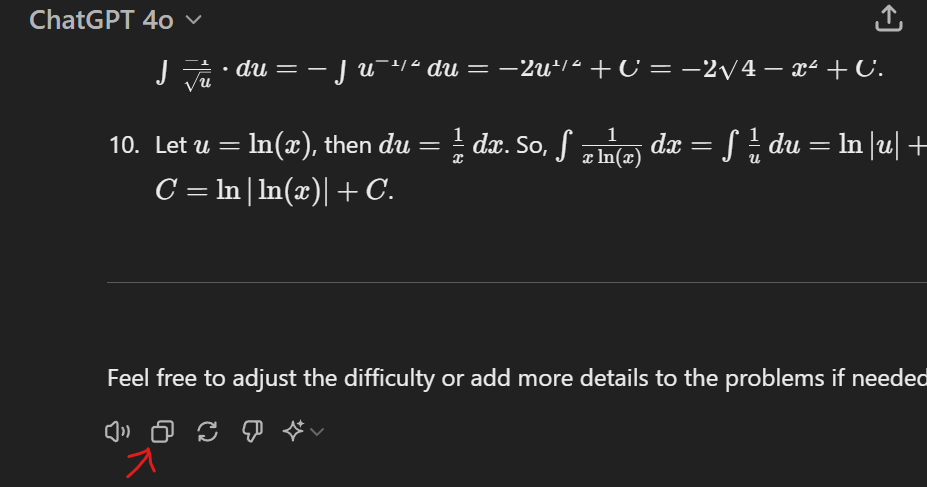
From there, you have two options:
- Select "File" > "Make A Copy" to add a copy of this document to your own Google Docs account.
- Copy and select the text, then paste it into an existing Google Doc.
Suggested GenAI Prompt
To ensure the converter can detect every equation, ask your model to write math explicitly in LaTeX. A sample prompt:
Generate a calculus quiz with 8 questions covering limits, derivatives, and integrals. Write every mathematical expression in LaTeX. Use inline math for short expressions by wrapping them in$ ... $and display math for multi-line work by wrapping it in$$ ... $$. Do not mix LaTeX with plain text numbers, and escape currency values with\$.
You can tailor the topic, number of questions, or difficulty, but keep the LaTeX formatting instructions so the converter produces clean output.